Middle-Earth
September 10, 2010 2:31 PM Subscribe
An interactive map of J.R.R. Tolkien’s Middle-earth. You can zoom and pan, search for or center a location, and link to a particular area. Place names are labeled in both English and Elvish.
Pan — You can pan through the map by clicking and dragging.
Zoom — You can zoom in and out using your mouse’s scroll wheel or by holding down your shift key while clicking and dragging.
Center — You can center the map on a position by double clicking.
Link — As you pan and zoom the map, the URL in the address or location bar updates to reflect a shareable, permanent link to the location you’re viewing.
Label Languages — You can switch languages with the drop-down selector in the bottom-left of the page, or by pressing, lower-case-L. You can turn off labels by pressing, upper-case-L.
Search — You can search for a location by its recorded names in the search field on the top right. Press enter or click on one of the auto-completed items to navigate to that location and to display additional information. You can navigate to the search box by typing slash and can leave by typing escape.
Pan — You can pan through the map by clicking and dragging.
Zoom — You can zoom in and out using your mouse’s scroll wheel or by holding down your shift key while clicking and dragging.
Center — You can center the map on a position by double clicking.
Link — As you pan and zoom the map, the URL in the address or location bar updates to reflect a shareable, permanent link to the location you’re viewing.
Label Languages — You can switch languages with the drop-down selector in the bottom-left of the page, or by pressing, lower-case-L. You can turn off labels by pressing, upper-case-L.
Search — You can search for a location by its recorded names in the search field on the top right. Press enter or click on one of the auto-completed items to navigate to that location and to display additional information. You can navigate to the search box by typing slash and can leave by typing escape.
We could not calculate between Rivendell and Mordor on foot.
posted by East Manitoba Regional Junior Kabaddi Champion '94 at 2:38 PM on September 10, 2010
posted by East Manitoba Regional Junior Kabaddi Champion '94 at 2:38 PM on September 10, 2010
Damn it
posted by East Manitoba Regional Junior Kabaddi Champion '94 at 2:38 PM on September 10, 2010 [1 favorite]
posted by East Manitoba Regional Junior Kabaddi Champion '94 at 2:38 PM on September 10, 2010 [1 favorite]
A lovely bit of cartography, even if you don't care about the books.
I picture a squad of copyright attorneys racing into action...
posted by Joe Beese at 2:38 PM on September 10, 2010
I picture a squad of copyright attorneys racing into action...
posted by Joe Beese at 2:38 PM on September 10, 2010
I zoomed all the way in and there's still no street map!
posted by danb at 2:41 PM on September 10, 2010 [1 favorite]
posted by danb at 2:41 PM on September 10, 2010 [1 favorite]
I was thinking of simply walking into Mordor this weekend
You do. You totally do.
posted by Joey Michaels at 2:45 PM on September 10, 2010 [3 favorites]
You do. You totally do.
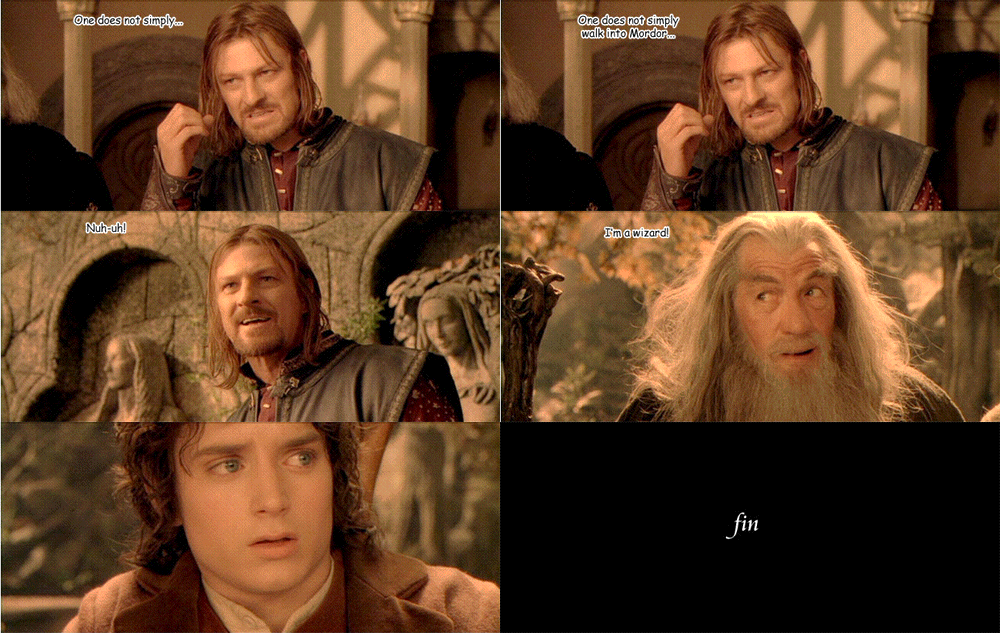
posted by Joey Michaels at 2:45 PM on September 10, 2010 [3 favorites]
No Orcish placenames? Racist Elvish bastards.
posted by doctor_negative at 2:45 PM on September 10, 2010 [3 favorites]
posted by doctor_negative at 2:45 PM on September 10, 2010 [3 favorites]
I was going to say that zooming in all the way was pointless for such large details, but then I found the West Tower, and thought: this is pretty awesome.
posted by filthy light thief at 2:47 PM on September 10, 2010 [1 favorite]
posted by filthy light thief at 2:47 PM on September 10, 2010 [1 favorite]
I was going to say that zooming in all the way was pointless
It is pointless. One does not simply zoom into Mordor!
posted by Sutekh at 3:18 PM on September 10, 2010 [4 favorites]
It is pointless. One does not simply zoom into Mordor!
posted by Sutekh at 3:18 PM on September 10, 2010 [4 favorites]
One does not simply zoom into Mordor!
Middle Earth needs mass transit. Mordor-rail!
posted by joe lisboa at 3:33 PM on September 10, 2010
Middle Earth needs mass transit. Mordor-rail!
posted by joe lisboa at 3:33 PM on September 10, 2010
Awesome. I love my Nook ereader, but one minus point is I can't pore over and geek out over the maps from my books, especially SF and fantasy. Digital books pretty much just delete maps altogether, and if they are left in, they're pretty unreadable. Hopefully the Nook (or Kindle or whatever) version 10 will have this kind of map reading ability, with a touchscreen and pinch to zoom. As a consumer I demand this, dammit!
posted by zardoz at 3:45 PM on September 10, 2010
posted by zardoz at 3:45 PM on September 10, 2010
The world famous, I don't often actually laugh out loud at a post, but I did at that (I have been drinking which also helps) but thanks for that.
posted by ciderwoman at 4:02 PM on September 10, 2010
posted by ciderwoman at 4:02 PM on September 10, 2010
They forgot Beleriand!
posted by goodnewsfortheinsane at 4:21 PM on September 10, 2010 [1 favorite]
posted by goodnewsfortheinsane at 4:21 PM on September 10, 2010 [1 favorite]
The Middle Earth map was one of the coolest aspects of the old MECCG (which was one of the coolest CCGs ever). This is awesome, thanks.
posted by Vindaloo at 4:21 PM on September 10, 2010
posted by Vindaloo at 4:21 PM on September 10, 2010
Zooming all the way out still didn't help me find Valinor on the map.
posted by Brak at 4:21 PM on September 10, 2010 [1 favorite]
posted by Brak at 4:21 PM on September 10, 2010 [1 favorite]
Could they possibly have picked a less legible typeface for this? If I didn't know almost all of these names I'd have no idea WTF they were.
posted by chimaera at 5:32 PM on September 10, 2010 [1 favorite]
posted by chimaera at 5:32 PM on September 10, 2010 [1 favorite]
I picture a squad of copyright attorneys racing into action...
Yeah, probably. This doesn't constitute a copy, but it's probably a derivative work.
They forgot Beleriand!
No, they didn't. It's underwater.
posted by valkyryn at 5:43 PM on September 10, 2010 [1 favorite]
Yeah, probably. This doesn't constitute a copy, but it's probably a derivative work.
They forgot Beleriand!
No, they didn't. It's underwater.
posted by valkyryn at 5:43 PM on September 10, 2010 [1 favorite]
No, they didn't. It's underwater.
And whose fault is that? What are you, one of Morgoth's cronies?
posted by goodnewsfortheinsane at 9:40 AM on September 11, 2010
And whose fault is that? What are you, one of Morgoth's cronies?
posted by goodnewsfortheinsane at 9:40 AM on September 11, 2010
Anti-Morgothist? Why do you hate freedom?
posted by Pallas Athena at 10:41 PM on September 11, 2010
posted by Pallas Athena at 10:41 PM on September 11, 2010
Great map. However, even at the highest magnification level, the map of the Shire is barren of names: the Four-Farthing Stone, Bywater, Buckland, etc. Perhaps in 2.0?
posted by ancientgower at 5:49 AM on September 12, 2010
posted by ancientgower at 5:49 AM on September 12, 2010
Anti-Morgothist? Why do you hate freedom?
There's nothing worse than a Middle Earth conspiracy theorist.
posted by grubi at 7:22 AM on September 13, 2010
There's nothing worse than a Middle Earth conspiracy theorist.
posted by grubi at 7:22 AM on September 13, 2010
« Older Motivated Grammar | Being locked in an RSS reader makes less and less... Newer »
This thread has been archived and is closed to new comments
posted by Senator at 2:35 PM on September 10, 2010 [1 favorite]